Siri AI Review in iOS 27: Apple's Voice Assistant Issues Persist
Read more
IOL
iol.co.za

Siri AI Review in iOS 27: Apple's Voice Assistant Issues Persist

Testing the updated Siri AI in the iOS 27 operating system showed that despite years of promotion, basic voice recognition errors continue to degrade the user experience.

As a technology enthusiast, the author eagerly awaited the release of iOS 27, which they installed on their iPhone 16e last week. The main reason for this anticipation was the opportunity to test the updated Siri AI.

Over the past two years, Apple has actively promoted its devices as being specifically designed for 'Apple Intelligence.' Renaming this feature to Siri AI seems typical for Apple—a preference for proprietary terminology to demonstrate superiority over competing tech giants.

The main advantage of this significant update was gaining access to a smarter Siri AI, which was supposed to interact intuitively and seamlessly, a stark contrast to the previous version, which was merely an improved voice assistant capable only of simple tasks, such as setting a timer.

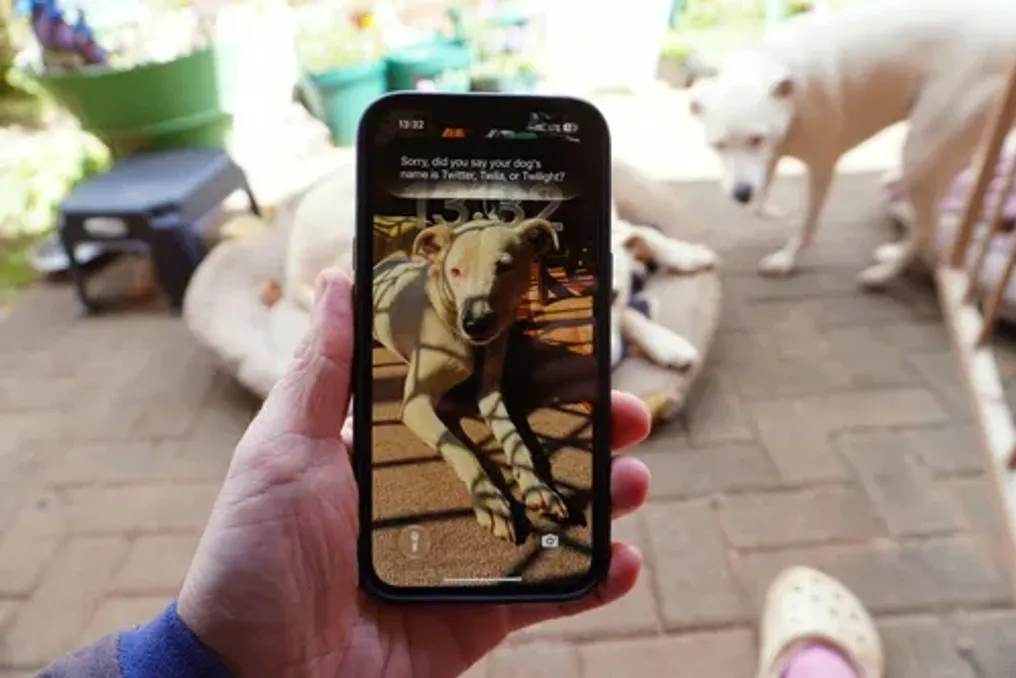
Immediately after completing the update, the author decided to test the new system's capabilities. They knew their photos were meticulously tagged: there were pictures of their old dog Bowie (named after David Bowie) and a younger dog Tuyla (named after a character from the series Schitt's Creek).

Despite both dogs being clearly labeled throughout their photo library, Siri's request to show a video of Tuyla was unsuccessful. In four separate attempts, the same disappointing result occurred: Siri mistakenly believed the command was misspoken and repeatedly offered to play trailers for the Twilight movies, which the author was not interested in.

Although the author has not yet conducted a comprehensive review of all features, the first impression was extremely negative. In the author's opinion, the new Siri AI still fails to meet high expectations.

Similar stories

Apple releases iOS 27.0.1 to fix restart bug on iPhones
Read more
tecnoblog.net

Apple releases iOS 27.0.1 to fix restart bug on iPhones

Apple released the iOS 27.0.1 update this Monday, September 28th. This new software aims to resolve a specific issue that caused freezing and restarts on certain models of the iPhone 18 Pro and Pro Max.

The defect was related to failures in Face ID authentication. The company had confirmed the existence of the problem the previous week after receiving user reports and conducting tests that replicated the restarts, although it did not disclose the exact technical cause of the failure.

According to the update's release notes, the iPhone 18 Pro and 18 Pro Max devices could unexpectedly restart whenever Face ID failed to authenticate the user. This inconvenience was more noticeable when attempting to access applications or content requiring biometric verification, resulting in the device stopping followed by a restart a few seconds later.

The portal 9to5Mac managed to reproduce the error on an iPhone 18 Pro while trying to open the Passwords app with the face partially obstructed. After the restart, a 'panic' log was detected in the system analysis area, indicating a critical failure that forced the device to shut down and restart. Some consumers even replaced their devices with new ones, fearing a hardware issue.

Although Apple has not specified the trigger for these restarts, it is relevant to note that the Pro models of this generation were introduced at the beginning of the month with a redesign of Face ID.

In addition to the Face ID issue, iOS 27.0.1 addresses two other problems found in the new Pro line iPhones. Under certain lighting conditions, photos taken with 2x zoom could display a color artifact when using the f/1.48 aperture; this behavior has been corrected by the update.

Additionally, another error allowed the screen to become unresponsive when the Notification Center and Control Center were accessed simultaneously. Both additional issues are also listed in the iOS 27.0.1 notes, but Apple chose not to provide detailed information about their origins.

Interested users can locate and install the new version by following the path Settings > General > Software Update.

Face ID failure on iPhone 18 Pro may cause unexpected smartphone restarts
Read more
tecnoblog.net

Face ID failure on iPhone 18 Pro may cause unexpected smartphone restarts

Some users of the iPhone 18 Pro and iPhone 18 Pro Max models have reported freezes and automatic restarts on their devices, an issue that arises after failures in biometric recognition via Face ID.

This inconvenience appears to occur specifically when the biometric feature is used more than once to access content or applications that require protection. The reports were shared online, and the portal 9to5Mac managed to replicate the failure on a European unit of the 18 Pro, where the device stopped responding to touch and restarted a few seconds later.

Although the exact scope of the problem remains uncertain, the failure does not seem to affect all devices in this line. The bug manifests when the system fails to authenticate the user within a secure application, such as the Passwords app, private Safari tabs, or other programs configured to require biometrics.

In tests conducted by the portal, the first recognition failure did not cause the iOS to crash. However, the freeze occurred when the user selected the 'Try Face ID again' option, a behavior distinct from that observed when using biometrics on the lock screen.

The same reports were found on the Reddit platform. An owner of the iPhone 18 Pro mentioned that their device had already frozen and restarted several times. Some users indicate that the error persists even without screen protectors, while others only notice the problem after Face ID fails initial identification and offers the option for another attempt.

The iPhone 18 Pro and 18 Pro Max models introduced a reduced version of the Face ID sensor array, with the infrared camera now integrated under the screen, near the watch area. It is unclear whether this new component is related to the errors or if there is a flaw in iOS 27. Apple support reportedly indicated a potential hardware failure in at least one service instance, and a Reddit user reported that the company suggested replacing the phone after trying some solutions.

Currently, there is no official fix available for this issue. As a temporary and unofficial solution, affected users are advised to avoid attempting biometric authentication a second time in protected applications and instead use the passcode.

Popular