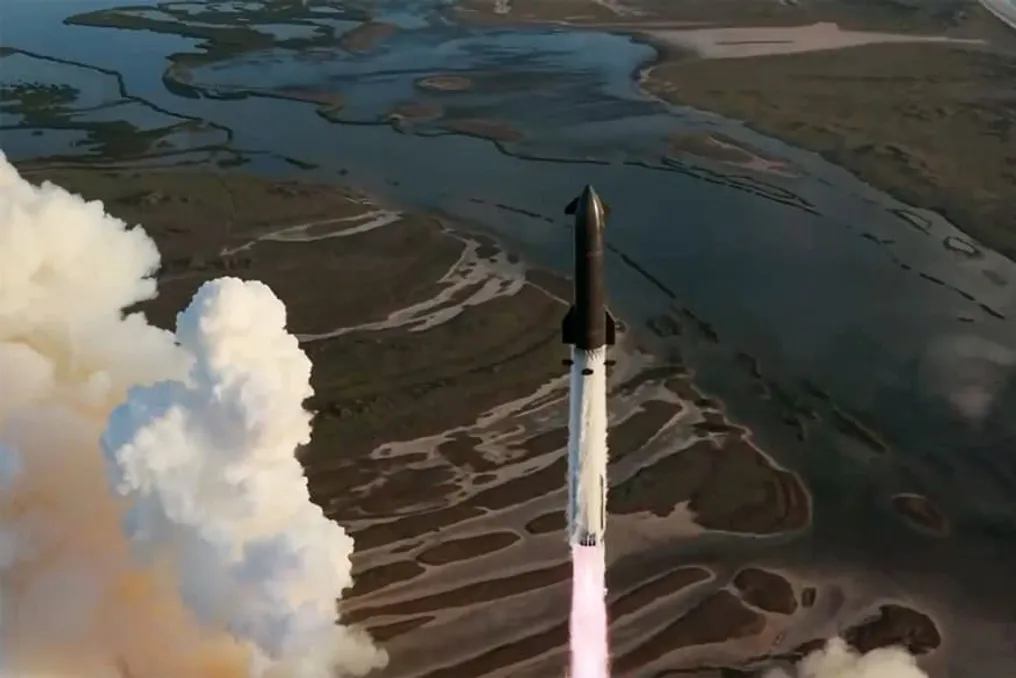
Starship reaches Earth orbit in SpaceX test flight, marking advance in space exploration
Read more
Olhar Digital
olhardigital.com.br

Starship reaches Earth orbit in SpaceX test flight, marking advance in space exploration

SpaceX registered a significant milestone by conducting the 14th test flight of Starship this Monday (28). The imposing rocket took off punctually at 9:48 AM Brasília time and successfully completed its first orbital mission.

This event constituted the third flight of 2026 and also the third of the vehicle's Version 3. It followed the success of the 13th test, which occurred in July and was notable for the softest landing of a upper stage of the spacecraft to date. In that previous test, the vehicle landed in the sea and remained afloat for several weeks until it was collected by the company for technical inspections.

Initially, the forecast was that Flight 14 would last approximately 9 hours and 50 minutes. However, during the live broadcast, SpaceX announced a change in planning, reducing the expected duration to three hours. The company justified this change in a statement, explaining that previous tests had maintained suborbital trajectories to ensure public safety while the team absorbed data on the rocket's performance.

Standing about 124 meters tall, Starship faced its biggest challenge in this flight: reaching Earth orbit. This achievement is considered vital, as NASA relies on this spacecraft to transport astronauts from the Artemis program to the lunar surface.

At 2 minutes and 34 seconds into the flight, Starship successfully executed the separation between the Super Heavy and Ship 41 stages. Subsequently, the booster completed its landing burn above the designated point in the Gulf of Mexico, while Starship continued with its burn to reach space. In this specific test, SpaceX did not intend to capture the structures using the tower arms.

The Super Heavy booster, which received engine improvements to prevent previous failures, landed softly in the Gulf of Mexico about seven minutes after takeoff, allowing the upper stage to proceed toward orbit. The spacecraft experienced the premature shutdown of one of the Raptor 3 engines but managed to compensate for this loss and complete the burn as planned.

At 10:11 AM, the continuation of the spacecraft to orbit was confirmed. The orbital insertion burn of Ship 41 was successfully completed after 25 minutes and 17 seconds of flight, a decision made by SpaceX after analyzing the ascent. The activation of a single Raptor 3 adjusted the craft's trajectory to a circular orbit at an altitude of 275 km.

At 35 minutes of flight, SpaceX began releasing 26 Starlink V3 satellites aboard Starship. This batch represents the first operational set of this new version, contrasting with the previous mission, which used only prototypes in suborbital trajectory. SpaceX's ultimate goal is to position one hundred thousand of these units in orbit to expand the wireless internet network.

The release of all satellites from Ship 41 took approximately 30 minutes. After being released, the satellites opened their solar panels to autonomously navigate to operational altitude. Three of these satellites were equipped with specialized cameras to inspect and evaluate the thermal shield plates of Starship immediately after the main vehicle separated.

According to the company, each new satellite adds 1 Tbps of capacity to the network, totaling 26 Tbps additional just in this mission. This volume is about ten times greater than the capacity provided by a Starlink V2 minisatellite launch carried out by a Falcon 9 rocket, considerably increasing the speed and coverage of the connections offered by the company's orbital system.

Analyzing the significance of this technical milestone, Marcelo Zurita, president of the Paraíba Astronomy Association (APA), member of the Brazilian Astronomical Society (SAB), technical director of the Brazilian Meteor Observation Network (Bramon), and columnist for Olhar Digital, emphasized during the live broadcast that Starship's high capacity makes commercial implementation more feasible than distant projects, such as space data centers.

Zurita clarified: 'The main thing is establishing Starship as a functional vehicle for putting satellites into orbit, which would be the first step of a commercial use of Starship – for now, it's just spending money.' He added: 'So, the first commercial use is what they did today. Although it is for an internal client, Starlink itself, it is already a commercial use of this spacecraft.'

The expert pointed out that the version destined for the Moon requires extra life support care to meet NASA's Artemis program, while crewed missions to Mars face obstacles related to artificial gravity limitations, postponing those plans until after 2040. Additionally, the real cost reduction depends on future full recovery tests of the stages.

Zurita stated: 'From now on, they would theoretically be able to serve other clients, but they continue testing because the launch cost will only be reduced when they manage to do everything they did today and recover and reuse both Starship and Super Heavy.' He projected: 'So, this should start happening in the next test flights, and from there we would have a commercially ready ship to operate, to be able to make regular launches at a lower cost.'

The astronomer concluded that 'The great revolution of Starship is this. The whole set, with Super Heavy and Starship forming this gigantic 124-meter-tall rocket, will have the most affordable launch system already available. With this cost reduction, they should be able to attract a good clientele in the market. From there come the adaptations for the lunar Starship and in-space refueling, which is another fundamental test for deep space missions, both for the Moon and for Mars, if that is truly the objective for the coming years.'

At the end of the mission, the spacecraft returned to the atmosphere at noon, culminating in a splashdown in the Pacific Ocean shortly before 1 PM.

Similar stories

Review of the 6 best Dell notebooks available for purchase in Brazil in 2026
Read more
tecnoblog.net

Review of the 6 best Dell notebooks available for purchase in Brazil in 2026

The choice of the best Dell notebook fundamentally depends on the consumer's usage profile, as the brand offers everything from compact models focused on productivity and mobility to laptops with larger screens, 2-in-1 formats, and configurations equipped with dedicated graphics cards for gaming.

In this guide, Tecnoblog presents six recommended Dell devices for purchase in Brazil in 2026, detailing the essential features, benefits, and limitations of each, helping the reader identify the device most suitable for their needs.

Dell XPS 13 9350

This model is strongly suggested for professionals and executives who require high mobility without compromising performance in their work activities. Weighing only 1.18 kg, it facilitates transport during meetings, travel, or daily use outside the workplace.

Its performance is ensured by the Intel Core Ultra 7 258V processor, which has 8 cores and reaches a maximum frequency of 4.8 GHz, guaranteeing constant agility in multiple tasks. Additionally, the inclusion of an integrated NPU transforms the device into a Copilot+ PC, prepared to enhance artificial intelligence functionalities in Windows 11 Pro, optimizing complex work processes.

For media consumption and visual work, the 13.4-inch OLED touchscreen offers superior quality with a resolution of 2880 x 1800 pixels and a refresh rate of 60 Hz. Usability is enhanced by the backlit keyboard and fingerprint reader, which add security and convenience.

In terms of connectivity, the device adopts the modernity of Thunderbolt 4 ports, which support DisplayPort and Power Delivery, along with Wi-Fi 7 and Bluetooth 5.4 technologies. It is important to note that, due to the lack of native USB-A or HDMI outputs, the user must plan to use adapters to connect conventional peripherals and monitors.

Alienware 16 Aurora

The Alienware 16 Aurora was designed with a focus on the dedicated graphics card, making it the ideal choice for the gaming audience. It is equipped with the GeForce RTX 4050, which has 6 GB of GDDR6 memory, working together with the Intel Core 7 240H processor, a 10-core chip capable of reaching up to 5.2 GHz.

With 16 GB of DDR5 and a 512 GB SSD, this combination is capable of handling demands that require heavy graphic processing, such as gaming, video editing, and creation software. The 16-inch panel features a resolution of 2560 x 1600 and a refresh rate of 120 Hz, providing greater smoothness during gaming sessions.

Although it weighs 2.49 kg, which can impact portability, Dell employs an internal structure dedicated to cooling the entire system. Its connectivity is robust, including Wi-Fi 7, Bluetooth 5.4, HDMI 2.1, USB-C, USB-A, and Ethernet, expanding connection options with wired networks, peripherals, and monitors.

Dell Pro 16

With a 16-inch screen, the Dell Pro 16 was conceived with a focus centered on productivity. It uses the Intel Core 7 150U chip, which has 10 cores and a frequency of up to 5.4 GHz, accompanied by 16 GB of DDR5 and a 512 GB SSD, but without a dedicated graphics card.

The display offers Full HD+ resolution, a 60 Hz refresh rate, and 300 nits of brightness, featuring an anti-glare finish. The configuration also includes a Full HD camera, fingerprint reader, and backlit keyboard, useful features especially in work and video conferencing contexts.

The platform also favors maintenance, as the model uses SO-DIMM memory modules, allowing easy access to crucial internal components such as RAM and SSD. Dell specifies support for Wi-Fi 6E and Bluetooth 5.3, in addition to USB, Thunderbolt, and HDMI ports.

The Inspiron 14 7440 stands out for its convertible design, which has a hinge allowing various usage positions, and its 14-inch touchscreen. Its hardware, based on Core i5-1334U, up to 16 GB of DDR5 RAM, and a 512 GB NVMe SSD, uses Intel integrated graphics and is primarily aimed at studies, productivity, and content consumption. The screen has a resolution of 1920 x 1200, WVA/IPS panel, 300 nits brightness, and a 16:10 aspect ratio.

This model also features a backlit keyboard, fingerprint reader, and two USB-C ports with DisplayPort 1.4 and Power Delivery. Additional connectivity includes two USB-A ports, HDMI 1.4, audio jack, and wireless connection, operating with the Windows 11 Home operating system.

Dell 14

The Dell 14 is presented as a suitable option for students, work, and productivity tasks. It comes equipped with a 14-inch screen, Intel Core 5 120U chip, 16 GB of DDR5 RAM, and a 512 GB SSD. This amount of memory provides greater capacity to keep multiple applications and tabs open simultaneously, although the integrated GPU is not ideal for heavy gaming.

This model's screen has a resolution of 1920 x 1200, a 16:10 aspect ratio, WVA panel, anti-glare finish, and 300 nits of brightness. The 16:10 aspect ratio maximizes vertical space for documents and pages, reinforcing the focus on mobility. Battery life may vary depending on the configuration, being available in 41, 54, or 64 Wh.

Additionally, the model features Wi-Fi 6, Bluetooth, and various types of ports. Depending on the version, the line can be found with Windows 11 Home, Windows 11 Pro, or Ubuntu. This notebook is ideal for those who need memory for multitasking and SSD, without the requirement of a dedicated graphics card.

Dell 15

The Dell 15 is a notebook with more modest hardware specifications, but it offers a 15.6-inch screen (Full HD), WVA panel, anti-glare finish, and a 120 Hz refresh rate. The larger size provides good workspace, while the refresh rate gives greater fluidity in browsing and compatible content.

Internally, it has a 13th generation Intel Core i5-1334U processor, 8 GB of DDR5 RAM, and a 512 GB PCIe NVMe SSD. The memory is in a single module and can be expanded up to 16 GB via two SO-DIMM slots. The graphics are Intel UHD integrated, keeping the main focus on productivity and daily use.

Regarding connectivity, it features Wi-Fi 6, Bluetooth, HDMI 1.4, USB-A, USB-C for data transfer, SD card reader, and headset jack, with Windows 11 as the standard operating system.

Final Considerations Before Buying

It is important to note that the Dell 15, equipped with Core i5-1334U, 8 GB of RAM, and a 512 GB SSD, represents a cost-benefit focused option, presenting a well-balanced configuration for daily use, studies, and work. Its 15.6-inch Full HD screen with a 120 Hz refresh rate, combined with the possibility of expanding RAM memory up to 16 GB, offers room for future upgrades.

The Alienware 16 Aurora ranks among the best gaming notebooks of 2026. This model combines the Intel Core 7 240H chip, the GeForce RTX 4050 graphics card with 6 GB of dedicated memory for gaming, 16 GB of RAM, and a 16-inch screen with high resolution and 120 Hz. The set also includes HDMI 2.1 and Ethernet.

The Dell Pro and Inspiron lines have proposals more aligned with specific uses within this guide. The Pro 16 prioritizes security and productivity features, while the Inspiron 14 2-in-1 adds the functionality of a touchscreen and convertible format. However, the Dell 14 also offers multitasking performance, making it a viable alternative for those looking for a study or work notebook.

The Dell XPS has a more compact and sophisticated characteristic, intended for professional use, thanks to its high-resolution OLED screen, 32 GB of RAM, and features like NPU and Wi-Fi 7. The Alienware is geared towards gaming, combining a more powerful processor with the dedicated GeForce RTX 4050 GPU and a 120 Hz screen for smoother animations. Finally, the Inspiron presents a more versatile proposal, aimed at daily tasks, such as the 2-in-1 version with a touch screen, although this line features simpler hardware compared to the other models.

Five basic Positivo notebook models recommended for daily use in 2026
Read more
tecnoblog.net

Five basic Positivo notebook models recommended for daily use in 2026

Positivo notebooks are known for offering basic specifications at affordable prices. The brand's catalog ranges from entry-level models, ideal for studies and daily routines, to more advanced options with greater memory, innovative designs, and processors optimized for multitasking.

In this article, Tecnoblog presents five Positivo notebooks considered advantageous for the year 2026, detailing the pros and cons of each to aid in the purchasing decision.

Positivo Vision R15M

This model is recommended for users who need a notebook for work, studies, browsing, and multitasking, featuring hardware superior to simpler models. It comes equipped with the AMD Ryzen 5 5625U chip, which has six cores and integrated Radeon graphics, along with 16 GB of RAM and a 256 GB SSD.

The large amount of memory facilitates the simultaneous execution of browsers, documents, and other programs, while the integrated GPU supports common graphic tasks. The 15.6-inch screen features Full HD resolution, an IPS panel, and an anti-reflective coating, characteristics focused on productivity and media consumption. Additionally, the Vision R15M integrates Minitela, a feature capable of displaying reminders, weather forecasts, or notifications. In terms of connectivity, it has Wi-Fi 6 and Bluetooth 5.2, as well as USB-A, USB-C, HDMI ports, an SD card reader, and a combined audio and microphone input.

Positivo Vision C15M

The Vision C15M is suggested for those looking for a device for basic tasks such as web browsing and studying, but who want to invest less money. It uses the Intel Celeron N4500 processor, aimed at elementary use, accompanied by 8 GB of RAM and 256 GB of eMMC storage.

A notable aspect of this model is the Linux operating system, which distinguishes it from other versions of the C15M sold with Windows. Therefore, it is crucial to check the exact product code before purchase if the user prefers a more familiar operating system. The main panel measures 15.6 inches, has Full HD resolution and IPS technology, with an anti-reflective finish. Although the size provides a vast workspace for spreadsheets and documents, it operates at a 60 Hz refresh rate and includes integrated Minitela.

Positivo Vision i15M

The Vision i15M can be classified as an intermediate specification notebook because it offers the Intel Core 3 N300 processor, 16 GB of RAM, and a 256 GB SSD in M.2 NVMe format. The 16 GB of memory allows keeping several applications and tabs open, and the SSD ensures faster storage compared to the eMMC of entry-level models.

This model's 15.6-inch screen also features Full HD resolution (1920 x 1080), an IPS panel, an anti-reflective finish, and a Minitela incorporated into the keyboard. The Vision i15M runs on Linux, offers Wi-Fi 6, and various connection ports. Positivo specifies support for up to 16 GB of DDR4 SODIMM memory and storage via M.2 NVMe SSD up to 4 TB. The device weighs 1.75 kg, and the battery promises up to eight hours of use, according to the manufacturer.

Positivo Vision N15M

For studies, browsing, and other basic activities, the Positivo Vision N15M uses the Intel N100 chip, which has four cores, combined with 8 GB of RAM and 256 GB of SSD. Positivo indicates that there is support for future upgrades, allowing up to 16 GB of RAM and storage up to 4 TB.

Its main screen is 15.6 inches, with Full HD resolution of 1920 x 1080, an IPS panel, and an anti-reflective finish. The device also includes a 1.54-inch Minitela to display notifications, reminders, system data, and other content. In connectivity, the Vision N15M brings Wi-Fi 6 and Bluetooth 5.2, in addition to USB ports, HDMI, card reader, and a combined input for headphones and microphone. According to Positivo, the battery life is estimated at up to eight hours.

Positivo Duo C4128E

The Positivo Duo C4128E is ideal for those who prioritize mobility, standing out for its 2-in-1 format: the 11.6-inch screen is touch-sensitive, and the hinge allows for a 360-degree opening, enabling the device to be used in multiple orientations. The processor is the Intel Celeron N4500, with two cores, and it comes with 4 GB of RAM and integrated Intel graphics. This configuration is suitable for light activities, although the amount of RAM limits multitasking capability.

Storage is 128 GB in eMMC, a different solution from the M.2 SSDs present in newer Vision models, and does not offer the same expansion ease. The Duo C4128E weighs approximately 1.1 kg, has an HD resolution screen, and comes with Windows 11 Home.

Positivo Vision R15M: The best cost-benefit

In summary, the Positivo Vision R15M stands out as the option most geared towards multitasking and represents the best value notebook from the brand. Its AMD Ryzen 5 processor has six cores and 12 threads, and the 16 GB of memory provides ample space to keep several applications and tabs open simultaneously. Furthermore, the SSD can be expanded if necessary.

Positivo Duo C4128E: Focus on portability

The Positivo Duo C4128E is the brand's 2-in-1 model. Its 11.6-inch touchscreen can rotate 360 degrees, allowing use in various positions, including with the screen folded back. This model is also designed for basic tasks and prioritizes portability, weighing about 1.1 kg.

It is possible to opt for an economical model from the brand if the focus is on acquiring a device for studies, internet browsing, video conferencing, and simple daily tasks. Positivo offers notebooks in this range of up to R$ 2,000 in Brazil, providing more modest hardware configurations. However, it is essential to conduct a meticulous comparison between the amount of RAM, the type of storage, and the operating system with competitors in the same price range. The final decision must always be based on the specific technical sheet of each model, and not just on the brand's reputation.

Popular