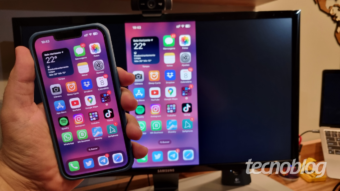
How to mirror a cell phone on a PC or laptop using wireless or wired methods
Read more
Tecnoblog
tecnoblog.net

How to mirror a cell phone on a PC or laptop using wireless or wired methods

If you have felt the need to view photos, manage notifications, or use mobile applications on a larger screen, the ideal solution is to mirror your cell phone onto a computer or laptop, which optimizes both leisure and productivity in the workplace environment.

To perform this transmission without the need for cables, it is sufficient to connect both devices to the same network and use native Windows functionalities or specific transmission applications. However, to achieve greater stability, it is possible to use a USB cable along with dedicated software to share the cell phone screen on the PC.

Tecnoblog details the procedure for mirroring an iPhone or an Android cell phone on a PC.

To mirror the cell phone screen on a PC wirelessly, the essential requirement is that both devices are connected to the same Wi-Fi network. This network proximity ensures that video data is transmitted without interruptions or visible delays on the screen.

The Windows operating system has immediate native support for wireless connections with Android devices. In the case of an iPhone, it is necessary to install an auxiliary application on both the computer and the phone to allow the wireless image signal transmission.

When transmitting the cell phone screen to the PC via USB, you just need a compatible data cable and a receiving software installed on the Windows and the smartphone. This wired option is recommended when seeking high image stability and elimination of any sluggishness.

On Android smartphones, the connection requires activating the advanced developer menu to enable data debugging. For the iPhone, the configuration is simpler, requiring only connecting the cable and authorizing the computer as a trusted device.

Windows has a native feature to project the cell phone screen onto the PC, provided both are connected to the same Wi-Fi network. This method works with several Android devices, especially those with specific functions like Samsung's One UI Smart View.

To start, press the Windows+I shortcut on the keyboard to access the operating system preference panel. On the home screen, select 'System' to see more options for the computer or laptop.

Navigate through the menu and click on 'Project to this PC' to check available connectivity features. Then, open the 'Start wireless app to project to this PC' option to open the receiving window, leaving the computer ready to receive the smartphone signal.

On the smartphone, swipe down the notification bar and activate the screen mirroring function, which may be called 'Smart View' or 'Cast', depending on the Android version. Then, select your PC's name to perform the mirroring.

The free application AirDroid Cast serves as a solution for mirroring an iPhone on a Windows PC, providing a fast and stable wireless connection. It is also useful for Android devices that lack native mirroring features to the PC, following the same procedure for both iOS and Google systems.

To begin, install AirDroid Cast directly from the Apple Store on the iPhone. On the computer, go to airdroid.com/cast/ to download and install the version compatible with Windows.

After opening AirDroid Cast on the computer, display the QR Code or the wireless mirroring code. On the iPhone, manually enter the 9-digit code and tap 'Start Mirroring', or use the option to scan the QR Code displayed on the PC monitor.

Next, tap 'Start Transmission' on the phone screen and confirm 'Start Sharing' to authorize screen sharing. Finally, in the pop-up window that appears on the computer, click 'Allow' to accept the request and start real-time viewing.

The Vysor tool is the most recommended option for transmitting the cell phone screen to the PC using USB, as it guarantees lower latency and a stable connection. The application works for both Android and iPhone, although Google system devices require prior preparation.

Download the Vysor application from the iPhone App Store or the Android Play Store. Subsequently, visit vysor.io to get the transmission software version for PC.

For Android devices, you need to go beyond the iPhone steps. Swipe up on the screen to open the app drawer and access 'Settings'. Navigate to the 'About phone' tab and then tap 'Software information'. Look for 'Build number' and tap repeatedly until a notice appears that developer options have been enabled.

Return to the 'Settings' menu and find the new 'Developer options' tab, located at the end of the list. Within the 'Debugging' section, activate the toggle next to 'USB Debugging' to authorize Android mirroring to the PC.

With the Vysor application running on the computer to detect and manage devices, connect the cell phone to the computer using the USB cable, and then open the Vysor application on the mobile device. On the PC, locate your smartphone's name and click the play button to mirror the cell phone via USB. Confirm the permission requested on the smartphone screen to release the image and start screen sharing.

It is possible to use a cable or adapter to connect the cell phone to an external monitor, which is great for displaying photos, videos, and presentations on a large screen without relying on wireless networks. This connection is physical and direct, turning the smartphone into a plug-and-play media player.

For Android devices, the most common way is to use USB-C to HDMI adapters or a USB-C hub with multiple HDMI outputs. iPhone users should opt for a USB-C or Lightning to HDMI or VGA cable, ensuring a high-definition signal on any screen.

The native AirPlay feature simplifies the process for those who want to mirror the iPhone screen on a Mac via Wi-Fi. Simply open the iPhone Control Center, tap the 'Screen Mirroring' icon, and select the macOS computer from the device list.

For Android users, the best alternative for mirroring the cell phone on a macOS notebook is to use the AirDroid Cast application, which establishes a wireless link between the two systems, similar to what happens when mirroring an iPhone screen to a Windows PC.

There are several ways to connect the cell phone to a TV to transmit content, with or without wire. Android owners use the Miracast standard, while the iPhone uses AirPlay technology for instant Wi-Fi mirroring. If a more stable physical connection is preferred, the most effective alternative is to use USB to HDMI adapters, allowing the device to connect directly to the television with cables, ensuring a continuous signal without dependence on wireless networks.

Similar stories

Scientists create mice with human brain cells for new neurological studies
Read more
super.abril.com.br

Scientists create mice with human brain cells for new neurological studies

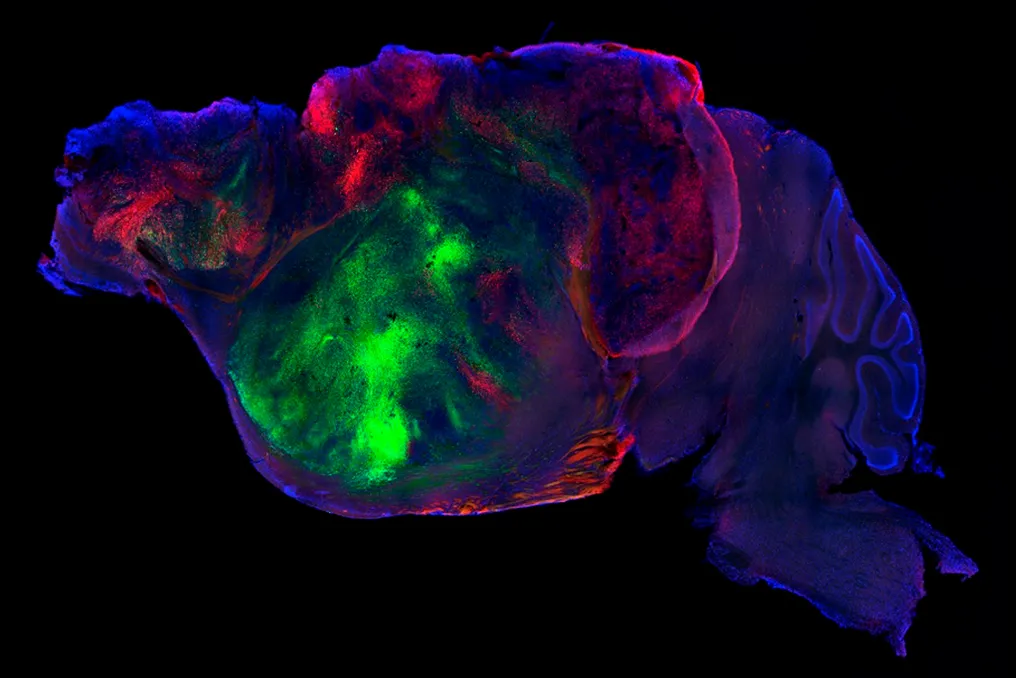
At Stanford University in the United States, a team of scientists is monitoring about twenty mice that, while appearing normal at first glance, contain an extraordinary element in their brains: millions of human neurons.

A new study published in the journal Nature describes how neuroscientists transplanted human brain cells into the brains of mice, filling incomplete areas of the nervous system. This procedure creates a new experimental model that may help identify causes or develop treatments for neuropsychiatric disorders, such as certain types of dementia or cerebral palsy.

This work marks a significant advance in efforts to recreate the human brain outside the body. Analyzing living neurons has been a persistent challenge in this field of research for several decades.

An alternative emerged in the early 2010s with the development of structures called organoids. Instead of examining a human organ directly, researchers began to be able to culture smaller, simplified versions of body tissues in the laboratory. For example, from skin cells, various cerebral organoids can be generated that mimic certain functions and characteristics of a real brain.

However, these replicas have limitations, as they lack blood vessels and are very small. Sergiu Pasca, one of the researchers responsible for the discovery of organoids and the current coordinator of the mouse study, stated in a release that it would be impossible to study complex human behaviors within a cell culture plate.

The attempt to overcome this limitation occurred in 2018, when scientists implanted cerebral organoids into the brains of mice. Subsequently, in a 2022 study, these cells were transplanted into the visual center of the animals, demonstrating that both mouse and human neurons responded to light.

More recently, in 2024, another study led by Pasca investigated Timothy syndrome, a rare genetic condition associated with epilepsy and severe autism, using organoids in young mice. This method allowed the team to assess the effectiveness of antisense oligonucleotides, a specific type of drug, against the disorder.

Although similar to the most recent study, the 2024 experiment used a more basic transplant, inserting human brain cells next to the brain tissues of young rodents, which were already rapidly developing, forcing the human organoids to compete for space.

In the current experiment, researchers used genetically modified mice that do not develop the cortex—the outer layer of the brain responsible for cognition, memory, and decision-making, and which is disproportionately larger in humans to support language and complex thought. In this location, inside the cranial cavity, there was an empty space filled with cerebrospinal fluid.

The surgery to inject the human cells was performed a few days after the birth of the mice, when primary brain connections were already established. Into this absent cortical area, hundreds of thousands of human cells were introduced. Without competition, they multiplied rapidly; in two or three months, the quantity almost quintupled, reaching about 4 million and occupying more than 90% of the space previously occupied by fluid.

These human cells, still immature (comparable to those of a fetus in the third trimester of pregnancy), activated and formed connections as the mouse lived. Furthermore, the human tissue managed to generate a specialized type of neuron linked to social cognition, fusiform neurons, which had never been created in a laboratory. These neurons are the first cells to die in cases of frontotemporal dementia.

The modified mice showed no visible differences compared to common mice, both in their movements and in performance on cognitive and memory tasks. However, an exception was observed when subjecting both types of mice to low oxygen conditions. While this deprivation can cause severe damage to the cortex in human infants, leading to cerebral palsy, the same does not occur in mice; however, the mice with human brain cells exhibited symptoms analogous to those of individuals with cerebral palsy.

Google, OpenAI, and Anthropic join forces to create an AI safety body
Read more
olhardigital.com.br

Google, OpenAI, and Anthropic join forces to create an AI safety body

Google, OpenAI, and Anthropic are advancing the creation of an autonomous organization intended to define safety standards for cutting-edge artificial intelligence (AI) systems. This initiative comes amid growing discussion about how increasingly sophisticated technologies should be regulated.

As reported by The Information, this safety group is taking shape, and the three companies have provisionally named the entity the Standards Authority for Frontier AI (SAFA). The intention is for this new structure to operate independently, helping to fill gaps in governmental AI oversight.

The idea of establishing more comprehensive guidelines gained prominence this week after OpenAI CEO Sam Altman and Anthropic CEO Dario Amodei debated AI safety at the United Nations Security Council (UN). Altman argued that crucial decisions regarding AI must be guided by democratic institutions and governments. Amodei, on the other hand, advocated for global standards and international agreements to test new AI models.

Additionally, OpenAI separately requested that the United States take the lead in international efforts to define technical standards for advanced AI systems, including those with recursive self-improvement capabilities.

Divergences on AI regulation

The suggestion of SAFA arises during a period marked by growing disagreements over the best way to regulate AI. On one side, there are proponents of stricter safeguards to mitigate potential risks associated with increasingly capable systems. On the other side, some argue that current legislation and market mechanisms are sufficient to address such threats.

The U.S. government is also participating in this debate. President Donald Trump has expressed opposition to new regulatory restrictions on AI, arguing that both the US and China should maintain technological development at the current pace.

In this landscape, the body proposed by Google, OpenAI, and Anthropic represents an attempt by the leading AI developers to standardize safety, while governments assess what degree of supervision should be imposed on the most advanced AI systems. The news about the union of Google, OpenAI, and Anthropic to create the safety body was initially published in Olhar Digital.

Review of the Best MacBook Models of 2026: Buying Recommendations
Read more
tecnoblog.net

Review of the Best MacBook Models of 2026: Buying Recommendations

Choosing the best MacBook in 2026 depends not only on the newest model, as Apple offers a range of options with different concepts. Among them are the MacBook Neo, designed for everyday tasks, as well as the MacBook Air and MacBook Pro, which differ in performance level, portability, and functionality.

In this guide, Tecnoblog has compiled the main available MacBooks to show the differences between models and determine which user profile suits them best.

The MacBook Pro with the M5 chip surpasses the MacBook Air thanks to stable performance provided by active cooling and hardware. It is equipped with a 10-core CPU and GPU, 16GB of unified memory, and a 16-core Neural Engine for working with AI tools such as Apple Intelligence.

For the most demanding tasks, the lineup offers 14.2-inch and 16.2-inch options with M5 Pro and M5 Max chips. These configurations can reach 128GB of unified memory and feature a 40-core GPU, but they come at a higher price.

The Liquid Retina XDR display features a resolution starting from 3024 x 1964 pixels, brightness up to 1600 nits, and an adaptive refresh rate of 120Hz, ensuring smoothness and accuracy when editing video. The model also supports up to 24 hours of battery life, is equipped with a 12MP Center Stage camera, a six-speaker system, studio microphones, and extensive connectivity options: HDMI, SDXC card reader, MagSafe 3, and three Thunderbolt 4 ports for external monitors.

The MacBook Air is available in 13-inch and 15-inch versions with an aluminum chassis and the M5 chip (up to 10 CPU/GPU cores and a 16-core Neural Engine). Unified memory ranges from 16GB to 32GB, and storage ranges from 512GB to 4TB.

This option is ideal for daily use, content creation, and editing, although it has thermal limitations compared to the MacBook Pro. The Liquid Retina IPS display provides 500 nits of brightness and a resolution up to 2880 x 1864, but operates at a fixed 60Hz because it lacks the ProMotion technology found in the Pro model.

Connectivity includes two Thunderbolt 4 ports, MagSafe 3, an audio jack, Wi-Fi 7, and Bluetooth 6, along with support for two external monitors. Battery life lasts up to 18 hours of video playback. The Air is also equipped with a 12MP Center Stage camera and Touch ID; the 15-inch version has six speakers (compared to four in the 13-inch model).

The MacBook Air M4 combines a 10-core CPU, up to a 10-core GPU, up to 32GB of unified memory, and a starting storage of 256GB. It is suitable for studying, work, and creativity, although its AI performance for the GPU is four times lower than that of the M5 chip.

Available in 13.6 inches (2560 x 1664 pixels) and 15.3 inches (2880 x 1864), the Liquid Retina IPS display delivers 500 nits and a fixed 60Hz refresh rate, which is less smooth than the 120Hz on the Pro model. In terms of connectivity, Apple provides two Thunderbolt 4 ports, MagSafe 3, a P2 headphone jack, Wi-Fi 6E, and Bluetooth 5.3, supporting two external monitors. With up to 18 hours of video playback, the model includes a 12MP Center Stage camera, three microphones, Touch ID, and keyboard backlighting.

The 14.2-inch MacBook Pro with M4 differs from the Air mainly in the display, cooling system, and ports. This model comes with the M4 chip (10 CPU/GPU cores, 16-core Neural Engine), 16GB of unified memory (expandable to 32GB), and a starting SSD of 512GB. Thanks to the active cooling system (fan), it maintains high performance longer than the Air, making it suitable for long workloads and using Apple Intelligence. The Liquid Retina XDR display features a resolution of 3024 x 1964 pixels, ProMotion up to 120Hz, brightness up to 1600 nits, and a nano-texture glass option. Ports include three Thunderbolt 4 ports, HDMI, SDXC card reader, MagSafe 3, and a P2 jack.

The MacBook Neo uses a different concept, employing the A18 Pro chip (from mobile devices) with six CPU cores, five GPU cores, a 16-core Neural Engine, and 8GB of unified memory, as well as options with 256GB or 512GB SSD. While it handles everyday tasks and macOS applications well, the limited memory capacity reduces its suitability for heavier applications compared to the Air and Pro models. It is compatible with Apple Intelligence and Siri AI, and its battery life reaches 16 hours. The Neo features a 13-inch Liquid Retina IPS display (2408 x 1506 pixels) with brightness up to 500 nits. Connectivity includes two USB-C ports, a P2 jack, support for one external 4K monitor at 60Hz, Wi-Fi 6E, and Bluetooth 6.

The choice primarily depends on the type of use and how much computing power, memory, screen quality, and connectivity the user requires. Among the presented models, the following should be noted:

The main difference between the MacBook Pro M4 and M5 lies in the processor generation leap, which provides a significant increase in speed, graphical computing capability, and energy efficiency. The MacBook Pro M5 retains the Pro concept, using a newer version of the chip with a 10-core CPU and GPU and a starting SSD of 1TB. Both models have a Liquid Retina XDR display, ProMotion up to 120Hz, Thunderbolt, HDMI, and active cooling. The transition to the M5 chip guarantees even greater responsiveness for intensive workflows and routines based on artificial intelligence.

The MacBook Air prioritizes portability due to its silent fanless design, whereas the Pro uses active cooling and offers more ports. Pro models also feature a Liquid Retina XDR display with ProMotion up to 120Hz, while the Air uses Liquid Retina with 500 nits of brightness.

Overall, the MacBook Air is suitable for daily needs, while the Pro is aimed at users seeking maximum performance and advanced display technologies. The MacBook Neo is the best value-for-money option for students who need a MacBook for studying, navigation, document editing, and other everyday tasks, especially if price is the main criterion. The MacBook Air (M4 or M5) offers a larger margin for multitasking and demanding applications thanks to 16GB of memory and an advanced chip, serving as an alternative for those willing to invest more. Thus, the choice is determined by budget and expected level of use.

The MacBook Neo is one of the best laptop options for studying, as it is light, has sufficient performance for navigation, document editing, streaming, reading PDFs, and other daily activities. With 13 inches and a weight of 1.23 kg, it is also focused on portability for those who frequently carry their laptop. For courses requiring programming, editing, or other heavier applications, the MacBook Air M4 or M5 offers a greater margin of performance and memory without complicating mobility.

Using a used MacBook may make sense if the price difference compensates for the age and limitations of the device. Before purchasing, it is important to check the model, chip generation, memory and storage capacity, as well as the battery condition and port functionality. It is also advisable to clarify how long the device will receive macOS updates.

Only at very low prices does the MacBook Air M1 still handle simple daily tasks well, but this is a 2020 model that lags behind newer models in performance, features, and support.

Popular